
Schema markup has become one of the most misunderstood tools in SEO. Some marketers ignore it entirely. Others stuff every page with every schema type they can find, hoping something sticks.
Both approaches miss the point.
The reality in 2026 is simpler than most guides suggest: a handful of schema types genuinely help blog content perform better in search, while most others add complexity without any measurable benefit. Google has become remarkably good at understanding content without structured data—which means schema now matters most when it provides information search engines can't easily extract on their own [1].
This guide cuts through the noise. We'll cover exactly which schema types move the needle for blog content, which ones to skip, and how to implement structured data without triggering spam filters or wasting development time.
Why Most Schema Advice Is Outdated (or Wrong)
If you've researched schema markup recently, you've probably encountered advice that was accurate in 2020 but doesn't reflect how search engines work today.
Here's what's changed:
Google has significantly reduced rich result eligibility. FAQ rich results, once displayed for nearly any page with FAQ schema, are now limited to "well-known, authoritative government and health websites" for most queries. The same pattern applies to HowTo schema—Google shows these rich results far less frequently than before.
Spam penalties have teeth. Google's spam policies explicitly target "irrelevant or misleading" structured data [2]. Sites that add schema unrelated to their visible content—or mark up content that doesn't match user expectations—risk manual actions or algorithmic filtering.
AI-powered search understands context better. Google's systems can now identify FAQs, how-to steps, and article structures without explicit markup. Schema provides diminishing returns when it simply restates what's already obvious from your content [3].
The outdated playbook—add every schema type, mark up everything, hope for rich snippets—now actively works against you. The modern approach requires more precision.

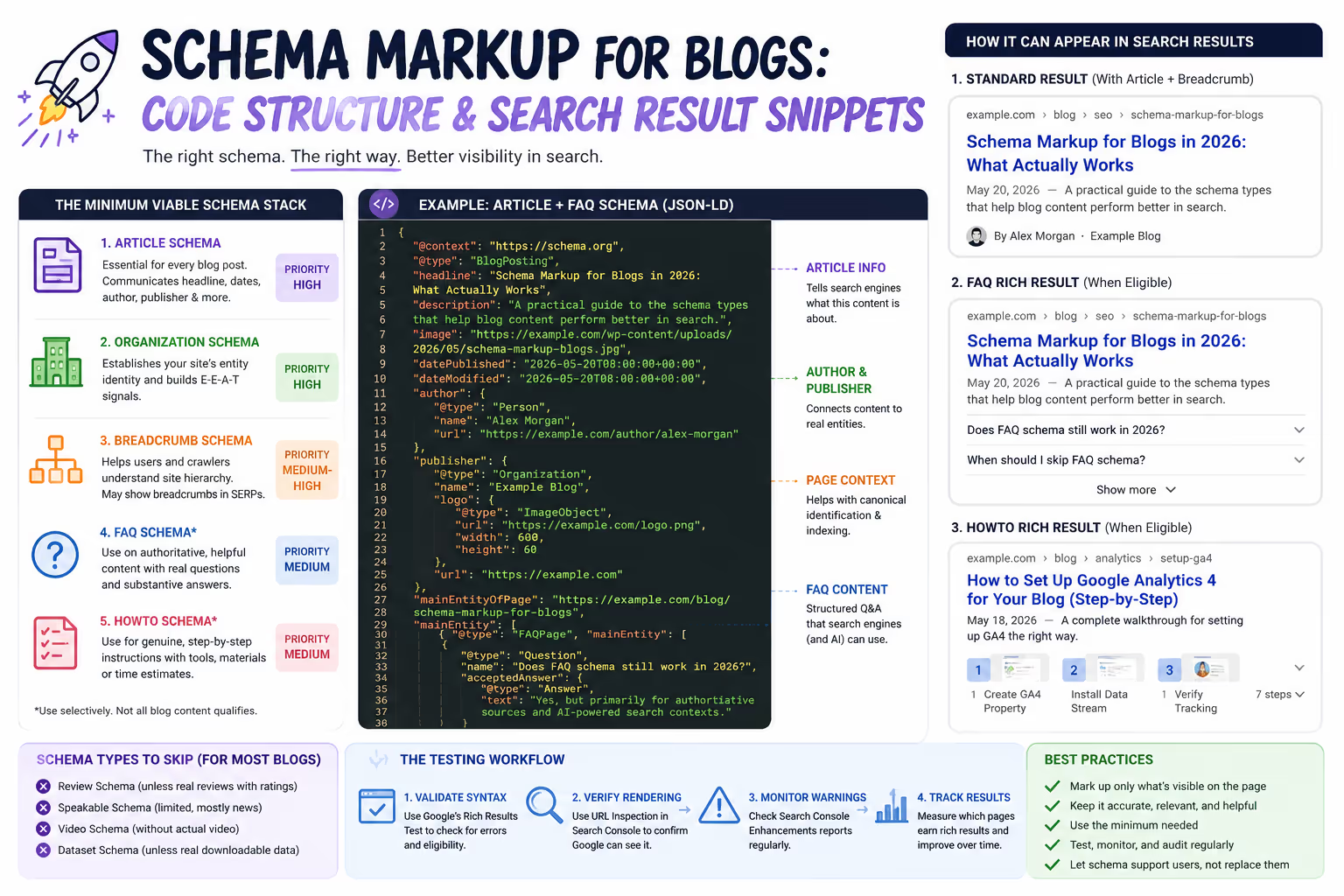
The Minimum Viable Schema Stack for Blogs
Think of schema implementation like a pyramid. Your foundation should be solid before adding anything else. For blog content, that foundation is surprisingly small.
Article Schema: The Non-Negotiable Foundation
Every blog post should include Article schema (or its subtypes: NewsArticle, BlogPosting). This isn't about chasing rich results—it's about giving search engines clean, unambiguous signals about your content's basic attributes.
Article schema communicates:
The headline and publication date
Author information
Publisher details
Featured image specifications
Google uses this information for search features, Google News inclusion, and increasingly for AI-generated answers. Without it, search engines must infer these details—and they don't always get it right.
Implementation priority: High. This should exist on every blog post, period.
Organization or Person Schema: Establishing Entity Identity
Your site-wide schema should include Organization (for company blogs) or Person (for individual creators) markup. This connects your content to a recognized entity in Google's Knowledge Graph.
Why this matters: E-E-A-T signals depend partly on Google understanding who is publishing content. Organization schema with your logo, social profiles, and contact information helps establish that identity.
Implementation priority: High, but typically implemented once at the site level rather than per-post.
Breadcrumb Schema: Helping Users and Crawlers Navigate
Breadcrumb schema communicates your site's hierarchy to search engines and can generate breadcrumb-style URLs in search results [4]. For content-heavy blogs with clear category structures, this improves both crawlability and click-through rates.
Implementation priority: Medium-high. Especially valuable for sites with clear topical silos.
FAQ Schema in 2026: When It Still Makes Sense
FAQ schema isn't dead—but its use case has narrowed dramatically.
Google now shows FAQ rich results primarily for authoritative sources on specific query types. For most commercial blogs, FAQ schema won't generate visible rich snippets. However, it can still provide value in specific circumstances.
When FAQ Schema Helps
Your site has genuine topical authority. If you're a recognized source in your industry—with established brand mentions, backlinks from authoritative sites, and consistent coverage depth—FAQ schema may still trigger rich results for relevant queries.
You're targeting AI-generated answers. Large language models and AI search features consume structured data when generating responses. Well-structured FAQ schema can increase the likelihood of your content being cited or referenced in these contexts [5].
Your FAQ content is genuinely helpful and unique. Schema that marks up original, substantive answers performs better than schema wrapping generic questions everyone asks.
When to Skip FAQ Schema
When your FAQs are thin (one-sentence answers)
When the questions don't appear in your visible content
When you're adding FAQ schema purely to chase rich snippets
When your questions are promotional rather than informational
The key question: Would removing this FAQ section make the page worse for users? If yes, schema is appropriate. If the FAQ exists only for SEO, skip the schema—and possibly the FAQ itself.
HowTo Schema: Narrower Than You Think
HowTo schema faces similar constraints. Google displays HowTo rich results less frequently, and eligibility requirements have tightened.
HowTo Schema Works When:
Your content provides genuine step-by-step instructions
Each step includes meaningful detail (not just "Step 1: Start")
The process involves tools, materials, or time estimates
Users are actively searching for procedural guidance
Skip HowTo Schema When:
Your "steps" are conceptual rather than actionable
You're writing thought leadership or opinion content
The how-to framing feels forced
A blog post explaining "How Content Marketing Works" doesn't need HowTo schema. A post walking through "How to Set Up Google Analytics 4 for Your Blog" likely benefits from it.
Schema Types That Rarely Help Blog Content
Several schema types get recommended frequently but provide minimal value for most blog implementations.
Review Schema
Unless you're publishing actual product or service reviews with ratings, Review schema on blog posts risks triggering spam filters. Google specifically warns against self-serving reviews and markup that doesn't reflect genuine user feedback [9].
Speakable Schema
Designed for content optimized for voice assistants, Speakable schema remains in beta and limited to specific news publishers. For most blogs, it provides no benefit.
Video Schema Without Video
Some guides recommend VideoObject schema even without embedded video, supposedly to suggest content "could be" video. This is exactly the kind of misleading markup Google penalizes.
Dataset Schema
Unless your blog post contains actual downloadable datasets, this schema type doesn't apply—regardless of how many statistics you cite.
The Testing Workflow Every Site Needs
Implementing schema without validation is like publishing code without testing. Here's a straightforward workflow that catches problems before they affect your search presence.

Step 1: Validate Syntax First
Google's Rich Results Test checks whether your schema is technically valid and eligible for rich results [10]. Run every new schema implementation through this tool before publishing.
Common issues caught at this stage:
Missing required properties
Incorrect data types (strings where URLs are expected)
Nesting errors in JSON-LD
Step 2: Verify Rendering
Schema that validates syntactically can still fail if it's not properly rendered. Use Google Search Console's URL Inspection tool to confirm Google sees your structured data as intended.
This step catches:
JavaScript rendering issues
Caching problems
Conditional logic errors
Step 3: Monitor Search Console for Warnings
After implementation, check Search Console's Enhancement reports regularly for the first few weeks. Google will flag issues like:
Missing recommended fields
Data mismatches between schema and visible content
New warnings about specific schema types
Step 4: Track Rich Result Appearance
Not all valid schema generates visible results. Track which pages earn rich snippets and which don't. This data informs future implementation decisions.
Common Implementation Pitfalls (and How to Avoid Them)
Even experienced developers make these mistakes. Awareness prevents most problems.
Pitfall 1: Marking Up Content That Doesn't Exist
Your schema must describe content that appears on the page. FAQ schema for questions that aren't visibly displayed, author information for uncredited posts, or ratings without review content all violate Google's guidelines [11].
Fix: Audit your schema against visible page content. Every structured data claim should be verifiable by looking at the page.
Pitfall 2: Duplicating Schema Across Templates
Template-based implementations sometimes apply identical schema to multiple pages—same author, same dates, same FAQs. This creates accuracy issues and may trigger duplicate content signals.
Fix: Ensure your CMS dynamically populates schema fields from actual post metadata.
Pitfall 3: Ignoring Schema After Implementation
Schema breaks. CMS updates change markup. New Google guidelines deprecate previously-valid approaches. Set quarterly audits to verify schema health across your site.
Fix: Add schema validation to your regular SEO audit checklist.
Pitfall 4: Over-Optimizing Schema for Rich Results
Stuffing schema with every possible property—optional fields, extended descriptions, unnecessary nesting—doesn't improve rich result chances. It increases maintenance burden and error probability.
Fix: Implement required and recommended fields only. Add optional fields only when they provide genuine informational value.
What Actually Moves the Needle
After working with countless blog implementations, patterns emerge about what drives measurable improvement versus what just feels productive.
Schema that helps:
Article schema with accurate author and publisher information
Organization schema establishing your site's entity identity
Breadcrumb schema for sites with clear information architecture
FAQ schema on genuinely authoritative, comprehensive content
HowTo schema on legitimately procedural posts
Schema that doesn't help most blogs:
Every other schema type applied "just in case"
Schema marking up thin or promotional content
Structured data that doesn't match visible content
Complex implementations without testing workflows
The goal isn't maximum schema coverage. It's accurate, maintainable structured data that helps search engines understand your content and potentially display enhanced results.

Building Schema Into Your Publishing Workflow
The most sustainable schema implementations aren't one-time projects—they're baked into content workflows.
Effective systems include:
Templates with pre-configured schema fields
Author profiles that automatically populate structured data
Validation checks before content goes live
Regular audits as part of technical SEO maintenance
For growing content operations, building this infrastructure early prevents technical debt and ensures consistent implementation across hundreds of posts.
Ready to publish SEO-optimized content with schema built in? The Mighty Quill's publishing workflow handles structured data implementation automatically—so every post goes live with clean, validated markup. Try it free with 2 articles in 48 hours.

Frequently Asked Questions
Does schema markup directly improve search rankings?
Schema markup is not a direct ranking factor, but it influences how search engines understand and display your content. Accurate structured data can earn rich snippets that improve click-through rates, and better entity recognition may indirectly support E-E-A-T signals. The ranking benefit comes from these downstream effects rather than schema itself.
How do I know if my FAQ schema is working?
Use Google's Rich Results Test to confirm your FAQ schema validates correctly, then check Search Console's FAQ enhancement report for indexing status. Even valid schema may not generate rich results—Google displays FAQ snippets selectively based on query type and site authority. Monitor search appearance over several weeks before drawing conclusions.
Can too much schema hurt my site?
Yes. Google's spam policies specifically address "irrelevant or misleading structured data markup." Sites that add schema unrelated to page content, mark up invisible content, or use structured data to misrepresent pages can receive manual actions or algorithmic filtering. Stick to accurate schema for content that genuinely exists on each page.
Should I use JSON-LD or Microdata for blog schema?
JSON-LD is now the recommended format for most schema implementations. Google explicitly prefers it, and it's easier to implement and maintain because the code sits separately from your HTML content. Microdata works but requires embedding attributes throughout your markup, making updates more complex and error-prone.
How often should I audit my schema markup?
Quarterly audits catch most issues before they cause significant problems. Check for validation errors in Search Console, test key pages with the Rich Results Test, and verify that schema content matches your actual page content. Major CMS updates or site migrations warrant immediate schema audits regardless of schedule.
Works Cited
[1] Google — "Understand how structured data works." https://developers.google.com/search/docs/appearance/structured-data/intro-structured-data
[2] Google — "Google Search spam policies." https://developers.google.com/search/docs/essentials/spam-policies
[3] Search Engine Journal — "How Google Uses Structured Data." https://www.searchenginejournal.com/google-structured-data-guide/
[4] Google — "Breadcrumb structured data." https://developers.google.com/search/docs/appearance/structured-data/breadcrumb
[5] Schema.org — "FAQ Page specification." https://schema.org/FAQPage


